BroadcastHQ
The second-monitor control panel for a dual-platform stream: stats, scenes, chats, audio, music and room lights.
What BroadcastHQ is
BroadcastHQ is the stream control panel behind The Late Build: a desktop app that sits on a second monitor and shows everything the streamer needs while live. It started on September 23, 2026 during a seven-hour session in which an AI agent built the stream’s OBS scenes, overlays, chat bots and a first dashboard from scratch, and it was renamed BroadcastHQ on October 3 (it was originally called the Vibe Coding Control Room). Today it is a full console for a dual-platform broadcast, and it has grown a long list of features because every stream turned up another thing worth automating.
It is built as an Electron app that talks to OBS Studio over its WebSocket interface, to the Twitch and YouTube APIs for viewer counts, to Streamlabs for alert events, and to a few small local services that serve the on-screen overlays. It is a design in the style of a broadcast console: dark, condensed headings, monospaced readouts and an amber “tally” accent for the live state.
The main screen
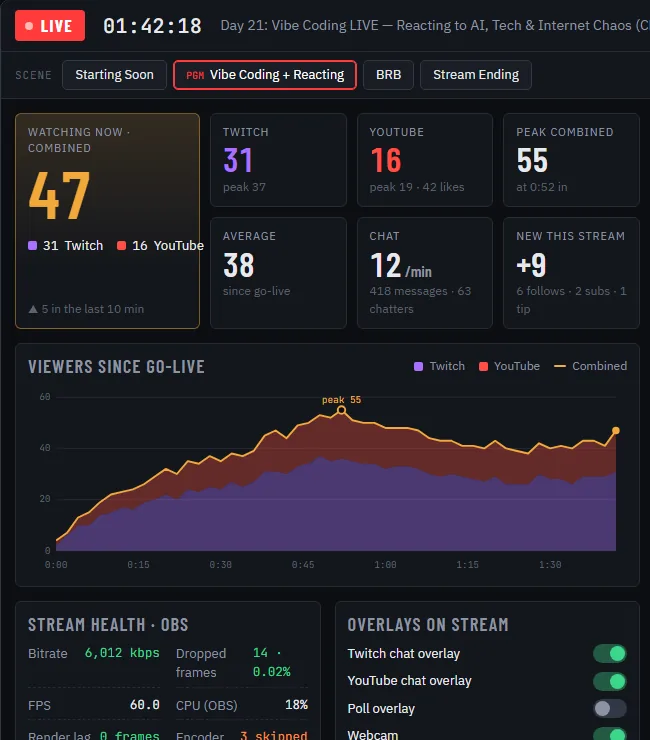
The top bar shows a LIVE or OFFLINE tally, the uptime timer, the stream title, status chips for Twitch, YouTube, the distribution service and OBS, and scene buttons for switching between Starting Soon, the main scene, BRB and Stream Ending, with the program scene highlighted. Below it, the layout has three columns. The left column is the only one that scrolls and holds:
- Metric tiles: combined viewers (with a Twitch and YouTube split), new followers this stream, per-platform counts, peak and average, chat messages per minute, chatters and a comparison with the previous stream.
- A viewers-since-go-live chart with stacked platform areas and a combined line.
- Stream health: bitrate, dropped frames, frames per second, CPU, render lag and encoder skips, read from OBS every couple of seconds.
- Overlay switches for the Twitch chat, YouTube chat, poll and webcam overlays.
- Stream preview, which uses no bandwidth until you expand it.
- An events log of follows, subscriptions, tips and raids with filters, plus buttons that fire a test alert so the on-screen alert can be checked without waiting for a real follower.
- A music card with a queue, sources, crossfade and scene volume profiles.
The center and right columns are the Twitch and YouTube chats in embedded panes. Twitch opens in a compact moderator view; YouTube is read-only inside the app (Google blocks sign-in in embedded browsers) with a button to open the chat in a real browser for moderation. Message counting is injected into both panes so the dashboard can show chat rates that match what is on screen.
A safer Go Live button
The most careful piece of code in the app is the button that starts the stream. Clicking the OFFLINE tally opens a menu to start now or after a countdown of ten seconds, thirty seconds, one minute, five or ten minutes. Both before the countdown and again at its deadline, the app checks fresh OBS state, that the Starting Soon (Live) scene exists, that the distribution output is configured, that local overlay and chat servers are healthy, and that the chat sources are configured. It selects and confirms the Starting Soon scene, and only then sends one start command. If any check fails, the start is blocked. Canceling, quitting, disconnecting, an external start or a late wake-up cancels a pending start. The stated philosophy is that “unknown” is not the same as “offline”: if OBS status is unavailable, the app says it does not know.
Audio routing without chaos
Audio was the hardest part and has its own subsystem. A streamer wants viewers to hear the browser, a music player and the microphone in one balanced mix, while personally hearing a different mix, with the ability to fix one side without touching the other. BroadcastHQ solves this with a dedicated local audio broker that owns the Windows audio helper and its own OBS connection.
- Each app, such as the browser and a media player, is captured independently in OBS and routed through a silent virtual cable so it is never doubled.
- Listening controls change only the owner’s monitor filter. Stream controls change only the OBS input fader and mute. A left-right balance control adjusts local listening only, which matters when the webcam sits near one speaker.
- Three output modes per app (Speakers, System and Headphones) switch where it plays, with careful rules about avoiding echo and restoring audio when the app or OBS closes.
- The gain sliders use a custom taper that gives fine control near normal levels, and a single shared playback equalizer offers three bands, a bypass and ten presets with a lock so a stray click cannot change it.
- Closing the app restores managed apps to the speakers and shuts the broker down.
The audio work was validated with 53 audio tests and 56 dashboard tests plus a read-only run against real hardware, which is why the notes say “audible checks remain owner verification.” Some things cannot be tested without ears.
Lights, Crowd Control and other fun
A Lights card controls a smart RGB bulb in the room over the local network. Modes include solid, fade, party, breathe, music, candle, ambient, a Platform War mode that blends Twitch purple and YouTube red by each platform’s share of chat, and a Hype mode that maps chat speed to brightness. The music mode captures system audio and sends beat information to the bulb. Because the bulb locks up if it receives too many commands, the code spaces updates at least 160 milliseconds apart, caps party effects below the bulb’s limit, and has a rejoin tool for when it still gets stuck.
A Crowd Control mode, which always starts disabled, lets chat commands like !light red, !party, !rainbow and !breathe change the lights, with per-command toggles and per-user, global and party cooldowns. Follows and subscriptions can flash the platform color, and tips or raids can trigger a short party. Nothing is posted to chat, so the effects do not add noise.
Other features include a to-do overlay (“Day To-Do List”) with a tip goal, Cursor Dodge (an OBS script that slides the webcam out of the way when the mouse rests on it), a vertical zoom and cursor-pan mode for the Shorts feed and a session reporter that writes a summary when the stream stops. A server lifecycle rule starts the local overlay and chat services when either OBS or BroadcastHQ opens and stops them about a minute after both are gone.
Vertical and dual streaming
On October 10, 2026, the stream added a vertical 1080 by 1920 output so a single YouTube broadcast could reach both the regular feed and the Shorts feed. The vertical scenes (screen, webcam with a vertical frame, a combined chat and a shared poll overlay) follow the main scenes automatically. BroadcastHQ treats this as a separate output with its own arming switch and checks, and the runbook records what was learned: YouTube resets the vertical source mode on every new broadcast, so it has to be set to Encoder before going live; a dual stream has no separate vertical link; and vertical-only analytics appear about a day later.
How it was built
BroadcastHQ is a good example of the workflow on the vibe-coding page. Agents write the code in bounded tasks, tests and previews check each change, and a long runbook records every decision and every gotcha, so a new session can start from the notes instead of from nothing. Safety rules live in the code: mutating audio actions require unlocked controls and a current revision, credentials are never sent to the interface, and a failed config parse keeps the last good values. The owner tests live, and restarting the dashboard mid-stream is safe because the session statistics resume from a saved file.
What is not done
- Some audio paths, such as headset checks, still need real-world listening.
- Per-tab Firefox audio control is not implemented, because tabs are one application mix.
- Agents that operate the stream are still limited by permission prompts, so a dropped connection mid-stream needed the owner to press stop and start by hand.
- Network drops over Wi-Fi remain the biggest operational risk, as described on the livestream page.
See the tools in action on the livestream, and compare with the agent-focused AgentDashboard, which does for coding agents what BroadcastHQ does for a broadcast.